Advertising

recent posts

Labels

Labels

About us

AkubeBlog is one of the top info-blogs in Nigeria with focus on information, news and general gossip It is a Nigerian info blog that bring you the latest and hottest info locally and internationally.

Sponsor

Flickr Images

Showing posts with label BizTech. Show all posts

Wednesday, 1 June 2016

Nigeria to meet investors next week

- No comments
Nigeria to meet investors next week
Nigeria will hold a non-deal roadshow in London next week, government sources said on Wednesday, as the country explores fund raising options to finance a record budget deficit widened by the fall in vital oil revenues.

The Minister of Finance, Kemi Adeosun with officials from the central bank and debt office will meet investors next Tuesday to update the market on government policies.

Standard Chartered Bank is organising the meeting, the source told Reuters.
Nigeria plans to borrow as much as $10 billion from debt markets, with about half of that coming from foreign sources, to help fund a budget deficit worsened by the slump in oil prices that has slashed revenues and weakened the naira.
thenationonlineng.net

Saturday, 21 May 2016

Uber shows off its first self-driving car

- No comments

© Provided by Engadget
Uber's foray into the world of self-driving vehicles will become a lot more visible in the coming weeks after the company confirmed its first autonomous car will officially hit the streets of Pittsburgh. The prototype -- a hybrid Ford Fusion -- will assist the company in collecting mapping data while putting its self-driving capabilities to the test. Uber's Advanced Technologies Center (ATC), which is headquartered in the city, has equipped the car with a variety of sensors including radar, laser scanner and high-resolution cameras, but a human rider will be present at all times.

NASA is using balloons to study space

- No comments
© NASA NZSPB1061_LAUNCH.jpg
Trying to send something to space by attaching it to a balloon and letting go sounds like a plan concocted by a six-year-old. In fact, we’re pretty sure a lot of you tried it back in the day, only to witness your probe snag on a tree branch fifteen feet up.

Wednesday, 18 May 2016

12 THINGS SUCCESSFUL PEOPLE DO DIFFERENTLY (MUST READ )

- No comments

I've always been fascinated by people who are consistently successful at what they do; especially those who experience repeated success in many areas of their life throughout their lifetime. In entertainment, I think of Clint Eastwood and Oprah Winfrey. In business, I think of Steve Jobs and Warren Buffett. We all have our own examples of super successful people like these who we admire. But how do they do it?.

How to Change the Links in Your Navigation Bar

- No comments
With my templates, the navigation bar doesn't automatically update whenever you add a new page. If you'd like to change the links in your navigation bar, either to add a new page or to take one off and replace it with another, here's how:

*Note: This works for all of my templates except the Reese. For the Reese, the general instructions are the same, but your code will look just slightly different*

Step 1: Login to your Blogger Dashboard.

Step 2: Go to the Layout section of your blog. To get there, select the "More Options" drop down to the right of your blog name and select Layout. It will look like this:


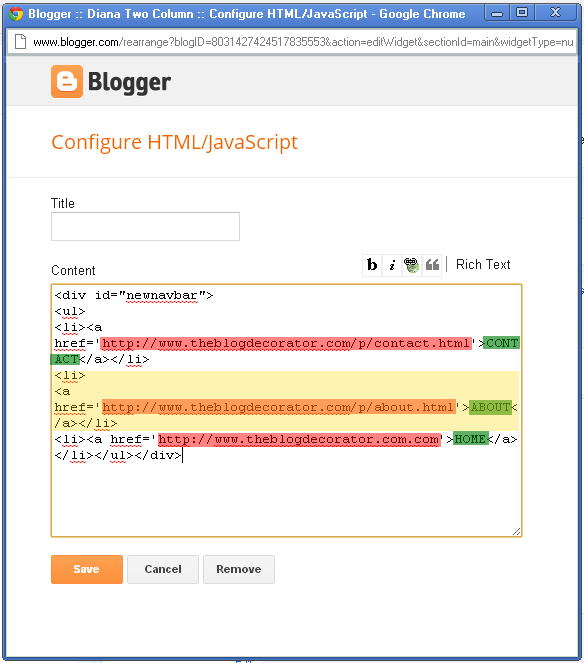
Step 3: Once there you'll see the "skeleton" of your blog layout. You need to find the HTML/Java Script gadget that houses your navigation menu. This is in a different place depending on your blog template. Usually it is just above your "Blog Posts" area or just below your "Header" area. You'll need to edit the HTML in this gadget. You'll know you have the right one if it looks something like this, but without the highlighted colors. It will say "newnavbar" somewhere near the top of the code:


Step 4: Here's what all the colors represent: 
  • The red highlighted area shows the link itself
  • The green highlighted area is the text that shows up in your navigation menu
  • The yellow highlighted area is the entire code for one link. If you need to add a link, copy everything in the yellow section, and paste it directly after the yellow section. Each link should start with a <li> tag and end with it's matching </li> tag
Before you edit anything, copy and paste the entire code into a text editor like Notepad (not Microsoft Word, as that will change your formatting). This way you'll have a back up to put back in there in case you accidentally break something. 

To change where the link is going, edit the red area. To change what shows up in your navigation menu, change the green. To change or add an entire link, edit the yellow section.You MUST be VERY careful not to edit the wrong part of the code or accidentally delete anything like an apostrophe. If you do that, you will break the code and you will have to pay me a small fee to come in and fix it. If you take your time and make sure you do it right, you should be fine!

Theblogdecorator...

Tuesday, 17 May 2016

Airtel 1+1 Android Plan 4GB cost 2000

- No comments

Airtel 1+1 Android Plan 4GB cost 2000 is one of the latest airtel internet bundle plans that is rocking the airways right now.airtel Nigeria have just introduced a new data plan for their users called 1+1 Airtel Android Plan 4GB which i believe is one of the cheapest android bundle plans at the moment.